Complex Ambiguity Function (CAF)
The complex ambiguity function is defined as:
\({\displaystyle \chi (\tau ,f)=\int _{-\infty }^{\infty }s(t)s^{*}(t-\tau )e^{i2\pi ft}\,dt}\)
[1]:
import matplotlib.pyplot as plt
from matplotlib import cm

import numpy as np
from scipy import signal
from sk_dsp_comm import sigsys as ss
from sk_dsp_comm import fir_design_helper as fir_h

%config InlineBackend.figure_formats=['svg'] # SVG inline viewing
FFT CAF using Transform Domain
Use a Lowpass Filtered White Gaussian Noise Signal
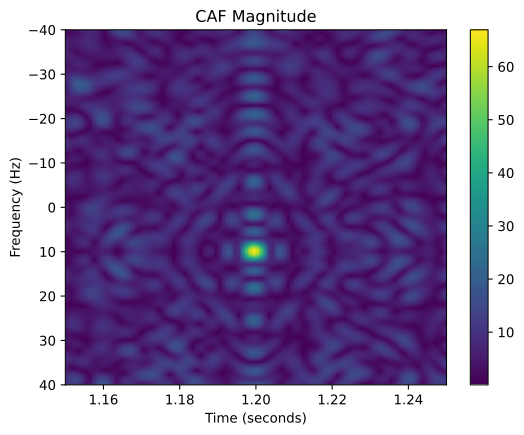
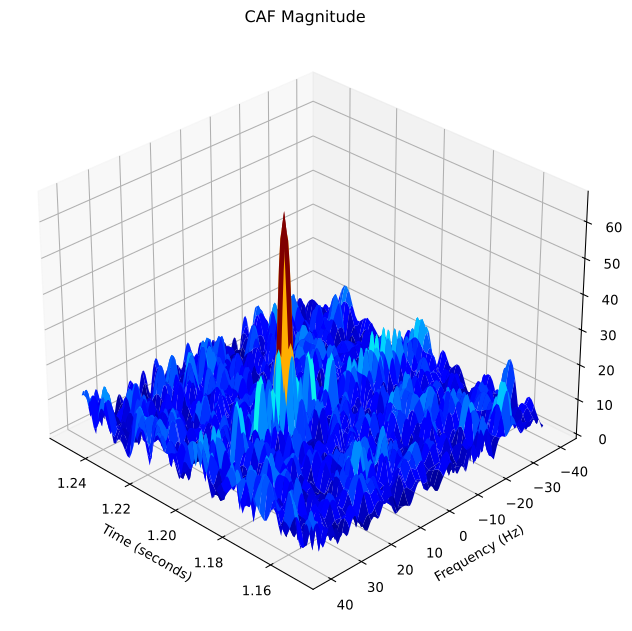
Here we design a lowpass filter to create a waveform with correlation. We snip out samples 900 to 1200 to form a correlation reference waveform. Stream in 2048 samples and use an FFT half-length of 1024. Display the CAF magnitude as an image and as a 3D surface. We also include a 10 Hz shift of the input to verify that the CAF correlation peak is centered at 10 Hz.
Note you have to make sure Nfft2 > len(b_lpf) so the transform domain correlation will work properly.
[2]:
fs = 1000
fd = 10
b_lpf = fir_h.fir_remez_lpf(100,150,0.1,80,fs)
print('N_b_lpf = %d' % len(b_lpf))
xp = signal.lfilter(b_lpf,1,np.random.randn(2048))
xp_ref = xp[900:1200] # create a reference waveform from xp
n = np.arange(len(xp))
yp = xp * np.exp(1j*2*np.pi*fd/fs*n)
# Use a non-power of 2 FFT to exact slice spacings (FFTW is somewhat slower)
y_caf_stream,faxis,taxis = ss.fft_caf(yp,xp_ref,n_fft2=1000,n_slice2=80,bs=0.5,fs = 1000.0)
plt.figure() # figsize=(6,6))
plt.imshow(abs(y_caf_stream[:,1150:1250]), extent=[taxis[1150], taxis[1250], faxis[-1], faxis[0]], aspect='auto')
plt.ylabel(r'Frequency (Hz)')
plt.xlabel(r'Time (seconds)')
plt.title(r'CAF Magnitude')
plt.colorbar()
plt.show()
N_b_lpf = 67
N_slice_step = 1 and BS_Hz_actual = 0.50Hz
N_slice_tot = 161 and span_Hz = +/- 40.00Hz
[3]:
# Create a 3D figure with axes with a specified size
fig = plt.figure(figsize=(8, 8))  # Adjust the width and height as needed
ax = fig.add_subplot(111, projection='3d')
# fig, ax = subplots(subplot_kw={"projection": "3d"})
tgrid, fgrid = np.meshgrid(taxis[1150:1250], faxis)
surf = ax.plot_surface(tgrid, fgrid, abs(y_caf_stream[:,1150:1250]), cmap=cm.jet,
                       linewidth=0, antialiased=False)
plt.ylabel(r'Frequency (Hz)')
plt.xlabel(r'Time (seconds)')
plt.title(r'CAF Magnitude')
# Change the view angle
ax.view_init(elev=30, azim=135)

plt.show()
Use a PN Sequence
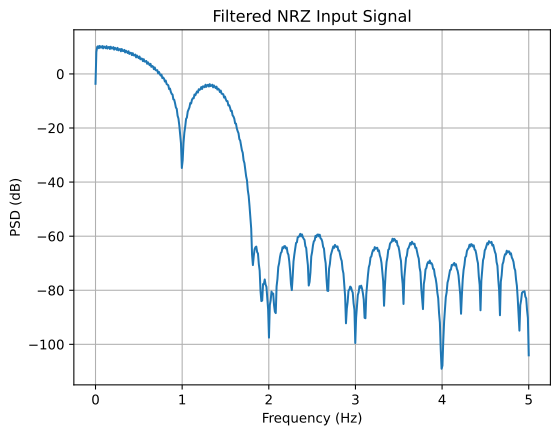
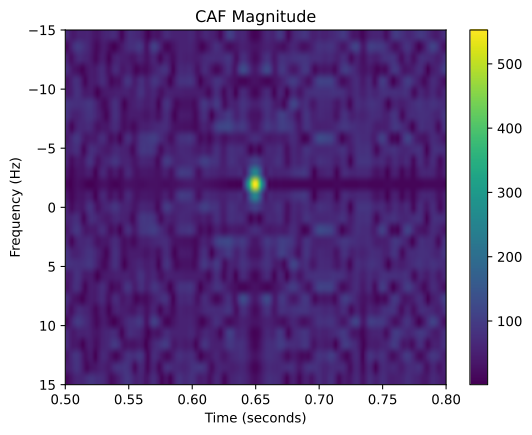
Here we use a PN6 for correlation with a 10,000 bit, lowpass filtered, NRZ waveform. The bit rate is 1 bps. The correlation waveform and input waveform each have 10 samples per bit. The reference waveform is pure NRZ, with the filtering only present on the input waveform. The FFT half-length is 1024 to increase the frequency resolution to \(f_s/2048 = 10/2048 = 0.00488\) Hz.
[4]:
b_nrz = fir_h.fir_remez_lpf(1.25,1.8,0.1,50,10)
pn_data = np.int16(ss.pn_gen(10000,6))
x_nrz, b2 = ss.nrz_bits2(pn_data,10,'rect')
# Reduce the Sidelobe level of the NRZ waveform
y_nrz = signal.lfilter(b_nrz,1,x_nrz)
Px_nrz, fx_nrz = ss.psd(y_nrz,2**10,10)
plt.plot(fx_nrz,10*np.log10(Px_nrz))
plt.title(r'Filtered NRZ Input Signal')
plt.ylabel(r'PSD (dB)')
plt.xlabel(r'Frequency (Hz)')
plt.grid();
[5]:
pn_period = np.int16(ss.m_seq(6))
h_ref, b1 = ss.nrz_bits2(pn_period,10,'rect')
h_ref2 = signal.lfilter(np.ones(5)/5,1,h_ref)
pn_data = np.int16(ss.pn_gen(300,6))
x_nrz, b2 = ss.nrz_bits2(pn_data,10,'rect')
y_nrz = signal.lfilter(b_nrz,1,x_nrz)
n = np.arange(len(y_nrz))
y_nrz_s = y_nrz * np.exp(1j*2*np.pi*(-2)/fs*n)
y_caf_stream2,faxis2,taxis2 = ss.fft_caf(y_nrz_s,h_ref2,n_fft2=1000,n_slice2=15,bs=1,fs = 1000.0)
N_slice_step = 2 and BS_Hz_actual = 1.00Hz
N_slice_tot = 31 and span_Hz = +/- 15.00Hz
[6]:
plt.figure() # figsize=(6,6))
plt.imshow(abs(y_caf_stream2[:,500:800]), extent=[taxis2[500], taxis2[800], faxis2[-1], faxis2[0]], aspect='auto')
plt.ylabel(r'Frequency (Hz)')
plt.xlabel(r'Time (seconds)')
plt.title(r'CAF Magnitude')
plt.colorbar()
plt.show()
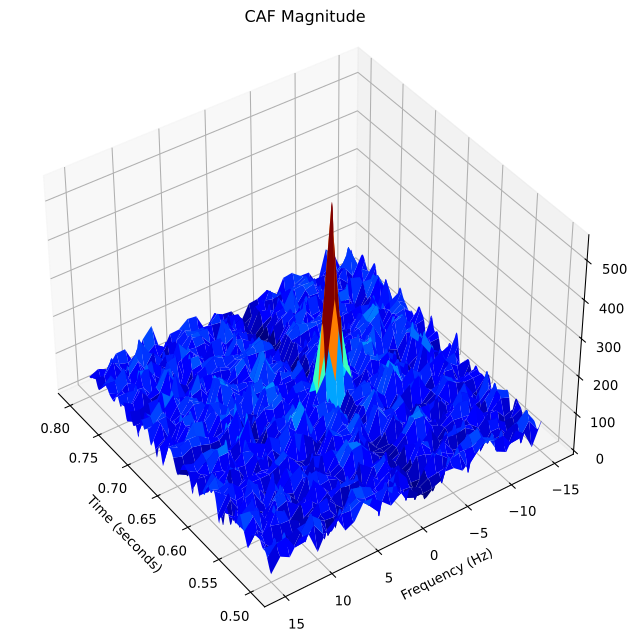
[7]:
# Create a figure and axes with a specified size
fig = plt.figure(figsize=(8, 8))  # Adjust the width and height as needed
ax = fig.add_subplot(111, projection='3d')
# fig, ax = subplots(subplot_kw={"projection": "3d"})
tgrid, fgrid = np.meshgrid(taxis2[500:800], faxis2)
surf = ax.plot_surface(tgrid, fgrid, abs(y_caf_stream2[:,500:800]), cmap=cm.jet,
                       linewidth=0, antialiased=False)
plt.ylabel(r'Frequency (Hz)')
plt.xlabel(r'Time (seconds)')
plt.title(r'CAF Magnitude')
# Change the view angle
ax.view_init(elev=40, azim=145)

plt.show()